Before you start
You need three things:
- A Windows PC that stays on while you want trading to run. When the PC or app is off, nothing trades and your money stays where it is.
- A wallet or an exchange account that holds crypto, such as MetaMask, Trust Wallet, Coinbase or Binance.
- At least $10 in a stablecoin (for example USDC) plus about $5 of ETH for gas, both on the Base network. Start with $10 to $50 until you are comfortable.
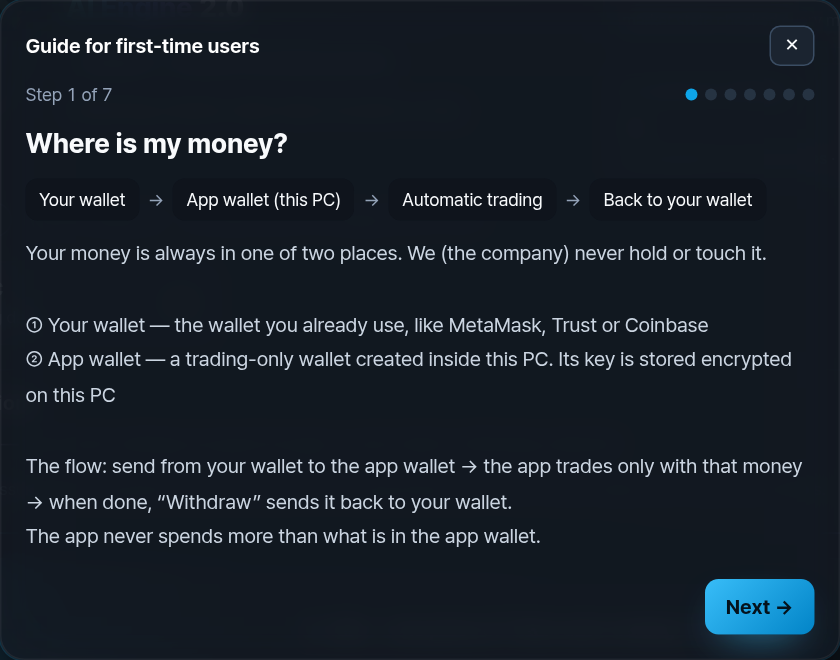
New users see a “New here? How your money moves” button on Home. It opens a 7-step version of this guide inside the app, with a button on each step that takes you straight to that action.
Practice with paper trading (free)
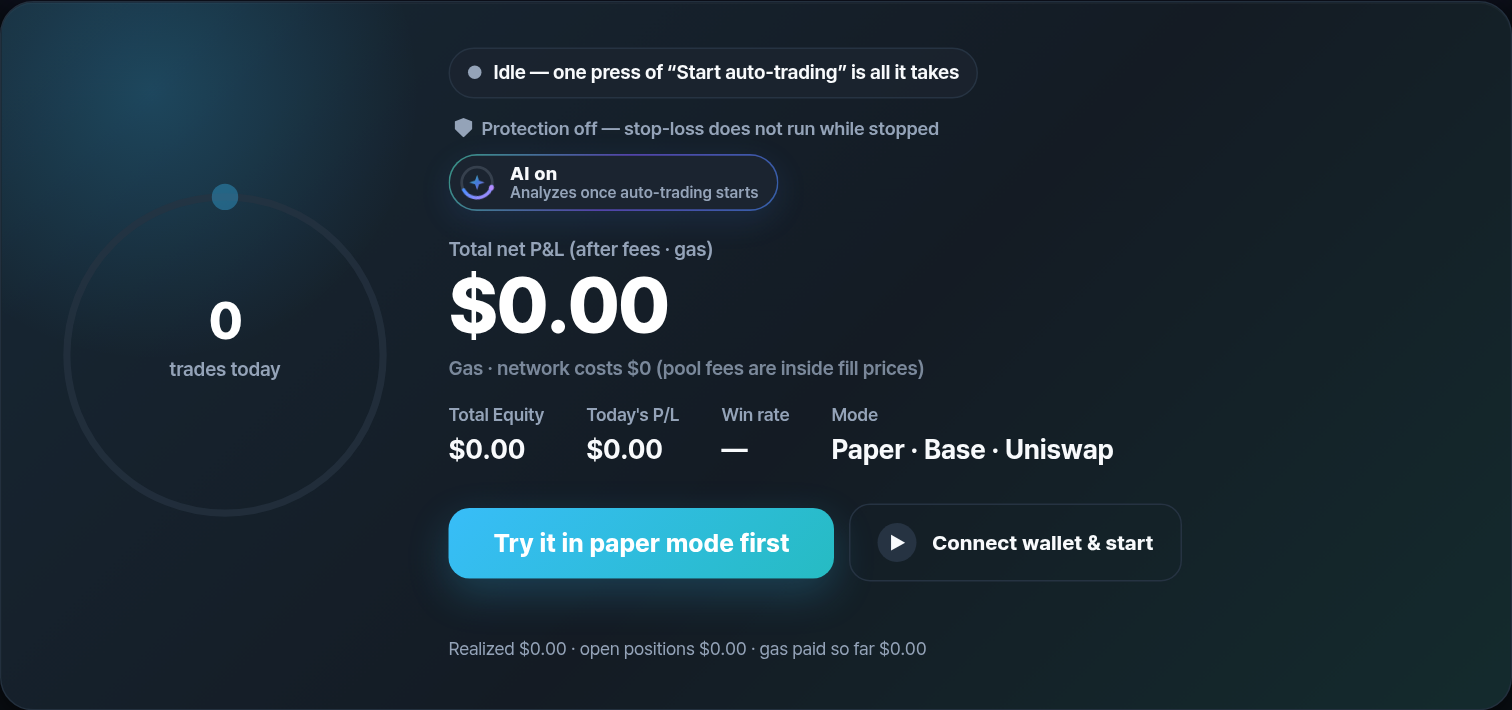
Press Try it in paper mode first. Paper trading follows real market prices but uses $2,000 of pretend money. You do not need a wallet or a deposit.
- Let it run for a few days and watch how the daily profit moves up and down.
- Expect some losing days. That is normal and it is better to see it with pretend money.
- Paper results are not a promise. Real trading adds pool fees, gas and small price differences.
Watch: Paper and live modes · English
Illustrative paper-mode demo. Not live returns. Automation requires your PC to stay on, awake and online.
Connect your wallet
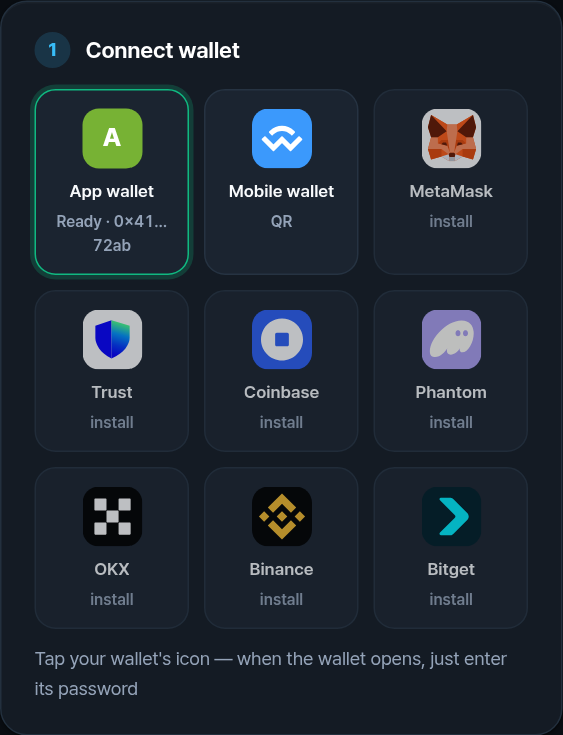
Under 1 Connect wallet, tap the icon of the wallet you use. For a phone wallet, scan the QR code with that wallet's app and approve.
- Connecting only lets the app see your address and ask to send. Every send is approved by you, in your wallet.
- To switch wallets, press Disconnect and pick again. The app does not reconnect to the old one by itself.
- No wallet? Tap App wallet and send money to its address from any exchange (step 05).
- Coinbase users: the Base app no longer connects to desktop apps by QR. Send from Coinbase to the app wallet's deposit address instead.
The 12 or 24 words and your private key never go into this app or this website. We will never ask for them. Anyone who asks is a scammer.
Watch: Wallet setup · English
Illustrative paper-mode demo. Not live returns. Automation requires your PC to stay on, awake and online.
See all your coins
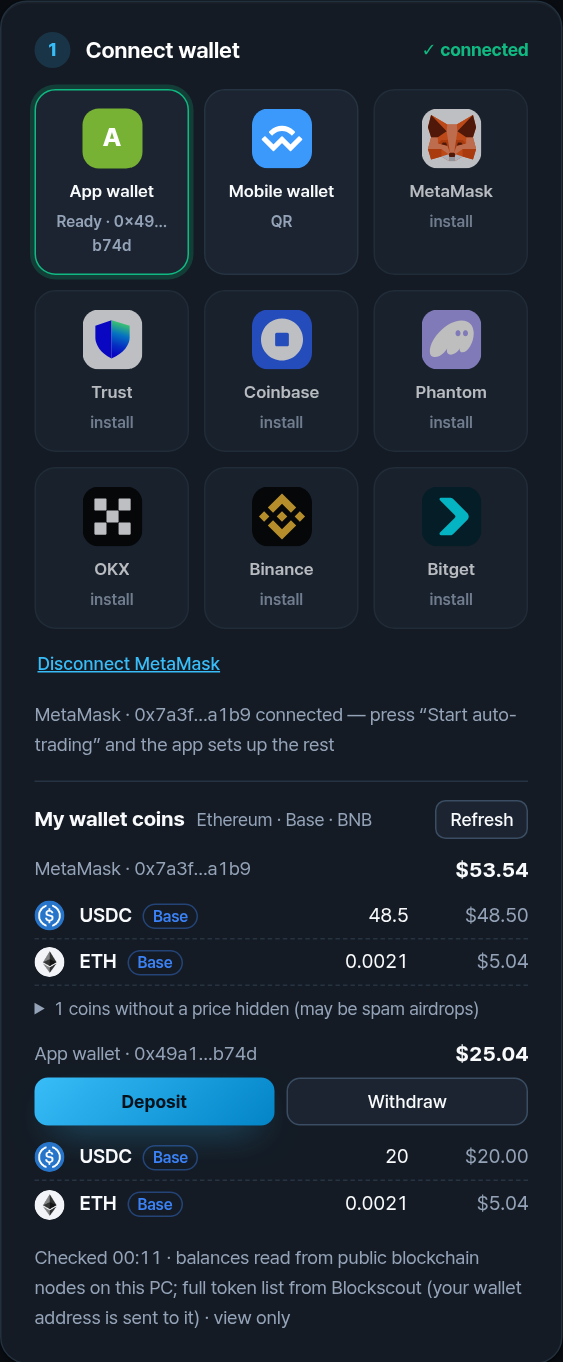
Once connected, My wallet coins lists every coin in your wallet and in the app wallet, with icons, on Ethereum, Base and BNB Chain.
- The colored tag shows the network each coin is on. The same coin name on two networks is two separate balances.
- Coins with no market price are folded away. They are often spam airdrops; do not interact with them.
- If you have money on a network other than the one the app is using, a yellow note appears with a Switch to … button.
- The app wallet group has the two money buttons: Deposit and Withdraw.
Privacy: to list tokens, the app sends your wallet address to Blockscout, a public block explorer. Balances themselves are read from public blockchain nodes.
Back up the app wallet key
The app wallet's key exists only on your PC. If the PC breaks or the app is removed without a backup, the money in the app wallet cannot be recovered by anyone, including us. That is why the app asks for a backup before it shows the deposit address.
- Choose a backup password (8 characters or more).
- Save the backup file.
- Type the password once more. The app opens the file to prove it can restore this exact wallet.
- Copy the file somewhere other than this PC: a USB drive, another computer or your own cloud storage.
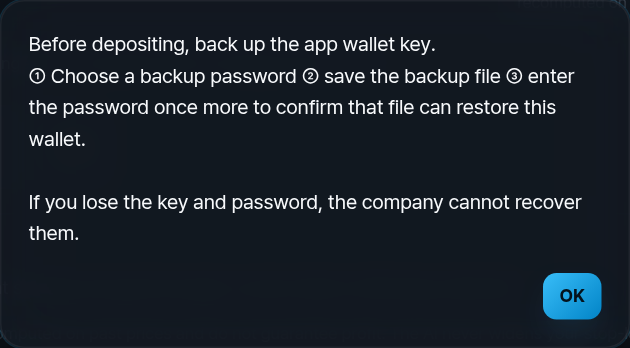
The backup file is encrypted with your password. Without it, the file cannot be opened. Write the password down and keep it apart from the file.
Add money — the network matters most
There are two ways to put money into the app wallet:
A. From your connected wallet
Press Deposit. Pick the coin (ETH for gas, or USDC to trade), type the amount and press Send. Your wallet shows the request; approve it there. The app remembers which wallet the money came from so it can send it back there later.
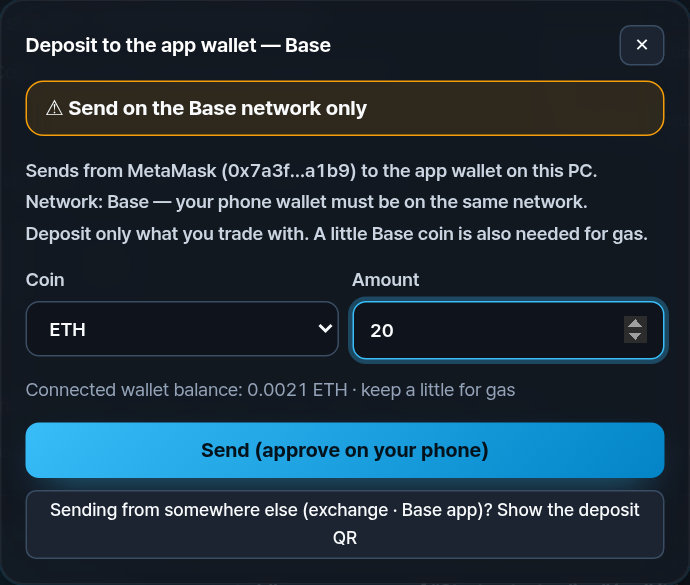
B. From an exchange or any wallet (QR)
Tap App wallet (or “Sending from somewhere else?”). Scan or copy the address and send to it from Coinbase, Binance or any wallet.
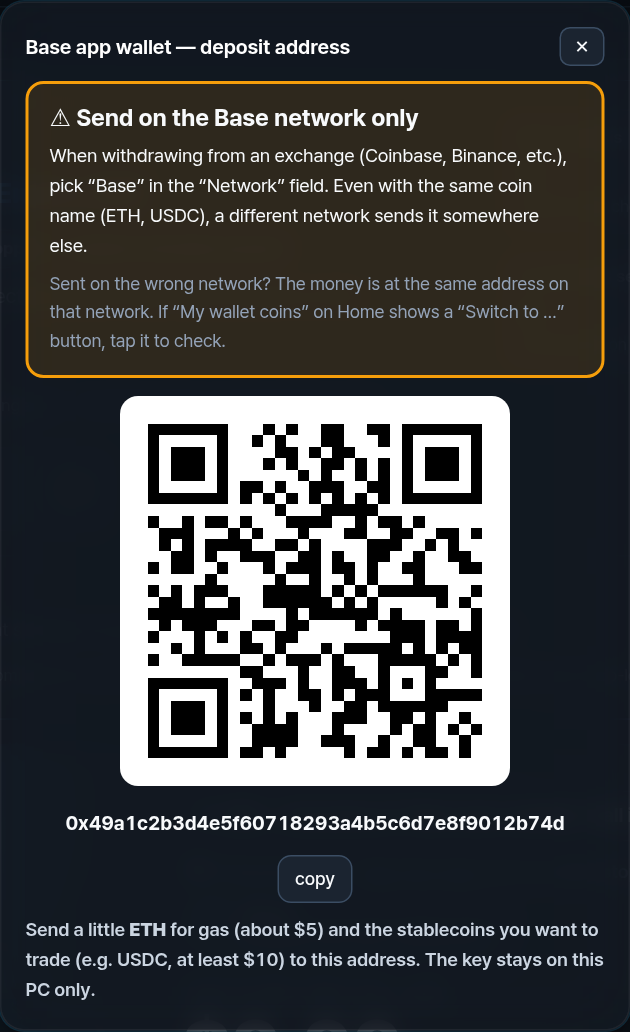
How much to send
| What | Amount | Why |
|---|---|---|
| Trading money (USDC) | $10 minimum | The app trades only with this. Start small: $10–$50. |
| Gas (ETH on Base) | ≈ 0.002 ETH (~$5) | Pays the network for each trade. Usually lasts several weeks on Base. |
On the exchange's withdrawal screen there is a Network field. Pick Base when the app is on Base. The coin name (ETH, USDC) can be identical on several networks; the network decides where it lands. If you pick a different one, the money is not lost: it sits at the same address on that network, and the app shows a Switch to … button so you can see it.
Why Base? Gas on Base is about $0.01 per trade. On Ethereum it is $0.50–$5 per trade, which can be more than a small account earns. The app warns you if you start on Ethereum with less than $100.
Choose a style and start
Pick a Trading style and press ▶ Start. Before anything happens, a confirmation shows the amount, the network, the coins, the daily loss limit and the costs.
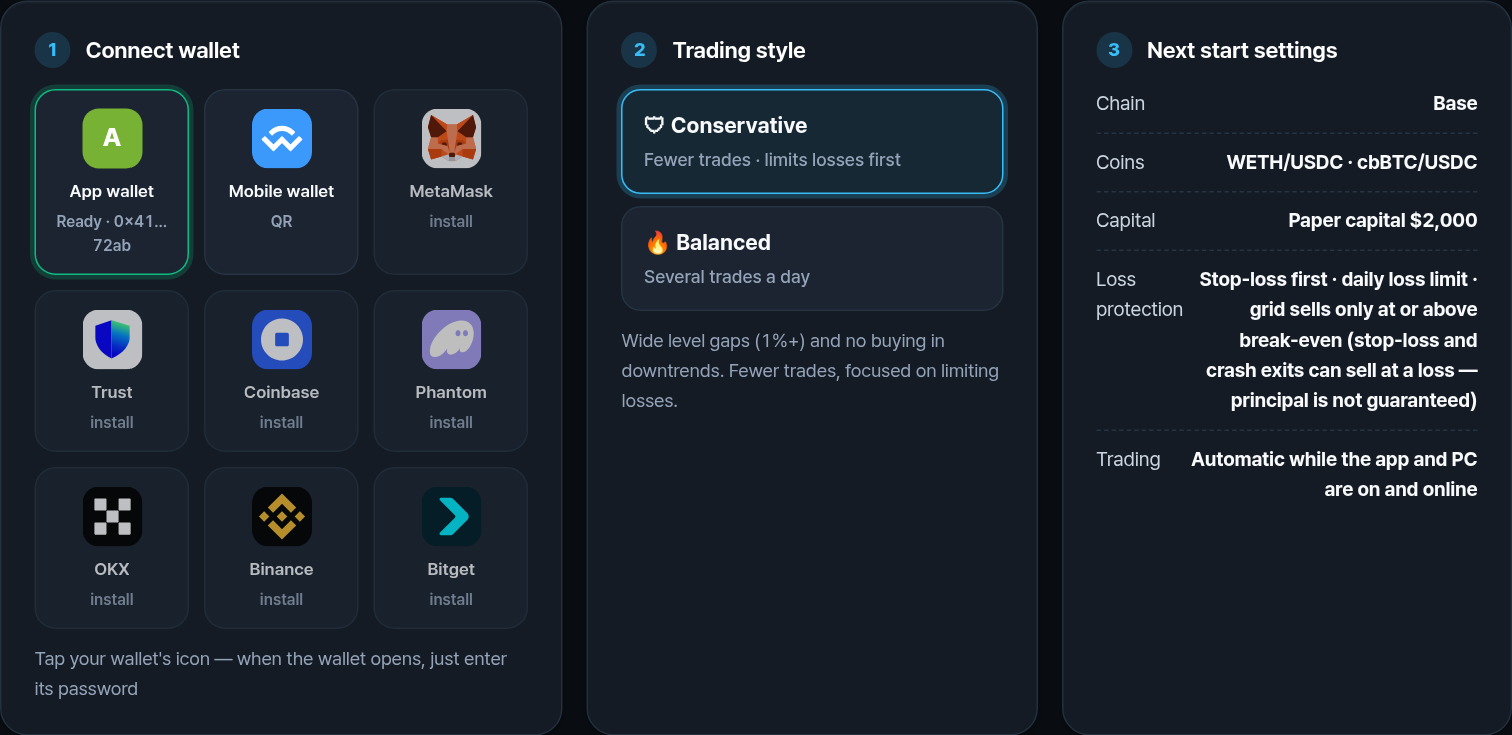
- Conservative: wider price steps, no buying while the price trend is down, fewer trades.
- Balanced: more trades per day, on cheap-gas networks.
- Order size scales with your money. With $10 the app places orders of about $3 and keeps at most about $6 in coins at once. The rest stays as cash.
- Daily loss limit: once reached, the app stops buying for the day. A stop-loss and crash exit can still sell at a loss to protect what is left.
If coin prices fall, you lose money. Only use money you can afford to lose. Past or paper results do not predict future results.
Watch: Choose your settings · English
Illustrative paper-mode demo. Not live returns. Automation requires your PC to stay on, awake and online.
Watch: Trading overview · English
Illustrative paper-mode demo. Not live returns. Automation requires your PC to stay on, awake and online.
Take money out
- Press ■ Stop. Withdrawals are blocked while trading runs, so no order is cut in half.
- Press Withdraw in the app wallet group.
- The first time, the app fills in the wallet that sent the money as your withdrawal address. Check it.
- Type the last 6 characters of that address to confirm it is right.
- Confirm. Everything in the app wallet — coins and cash — is sent to that address. A little gas may stay behind.
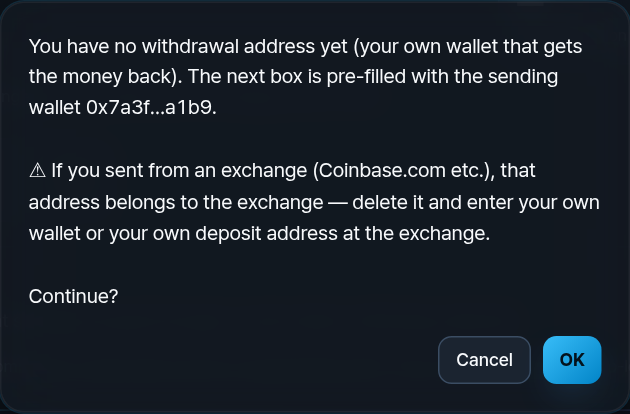
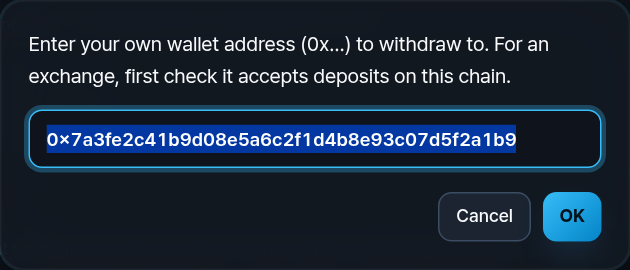
- Changing the withdrawal address takes effect after 24 hours. If someone else got into your PC, this delay gives you time to notice.
- Sent from an exchange? The sending address belongs to the exchange, not to you. Replace it with your own wallet, or with your exchange deposit address on the same network.
- Withdrawals always work, even if your subscription has ended.
Every cost, in one place
| Cost | How much | Who receives it |
|---|---|---|
| Pool fee | 0.05%–0.3% per trade | The exchange pool (liquidity providers). Included in the trade price. |
| Gas on Base | ≈ $0.01 per trade | The Base network |
| Gas on BNB Chain | low, a few cents | BNB Chain |
| Gas on Ethereum | ≈ $0.50–$5 per trade | Ethereum |
| Deposit / withdraw | one gas fee each | The network. Exchanges may add their own withdrawal fee. |
| App subscription | Free $0 · Pro $19.99/month or $149/year | NYC Capital Asia Inc. Free needs no card and has no time limit. Pro renews until canceled; returns to Free after the paid period. Refund exceptions and mandatory consumer rights apply (see Terms). |
The Home number Total net P&L already subtracts fees and gas, so it is the figure that matters.
Who can access your money?
Can the company access my wallet or money?
No. The app wallet key is created on your PC and stored there, encrypted by Windows. It is never sent to us. We cannot move, freeze or reverse your funds. If you connect MetaMask or a phone wallet instead, the key stays in that wallet and the app only asks it to approve.
Where does my money actually sit?
On the blockchain, at your own wallet address. The app is only the tool that signs trades on your PC and sends them straight to the network — not through our servers.
What does the company receive?
Pro subscriptions are not open yet. When they open, billing and licensing may require your email, payment references and license status. Wallet keys are never sent to us. Website analytics and third-party network services are described in our Privacy Policy.
If I lose my PC, can you recover my funds?
We cannot recover your private key or reset the password of your encrypted backup. Recovery requires a valid backup and its password, or another securely retained recovery method. Back up before depositing and store the backup separately from your PC.
How do I know the app is genuine?
Download only from the official download page at gridoradex.com. Windows should show the publisher NYC CAPITAL ASIA INC.; do not install a file with a different or unknown publisher. We never ask for your recovery phrase or private key.
If something goes wrong
I sent money and it does not show up
Check the network you sent on. Open My wallet coins: if a yellow note says money is on another network, press Switch to …. On EVM networks (Ethereum, Base, BNB) the app wallet has the same address on every network, so the money is there.
The PC turned off or lost internet
Trading pauses. Your coins and cash stay in the app wallet. Open the app again and press Start, or Withdraw.
My PC broke
Install the app on another PC and restore the backup file from step 04 with its password. Then withdraw.
I want to stop for good
Press Stop, then Withdraw. Check that the money arrived in your wallet, then cancel the subscription.
Someone from “support” asks for my recovery phrase
It is a scam. We never ask for it, by email, chat, phone or anywhere else. Contact [email protected] if you are unsure.
Five safety rules
- Never type your recovery phrase or private key anywhere.
- Back up the app wallet key before you deposit, and keep the file off this PC.
- Send on the same network the app shows (Base for most users).
- Start with $10–$50 and paper trade first.
- Only invest what you can afford to lose.