A new Pro mode screen.
A living AI-brain sphere sits at the center of Home, linked to every card. Available with Pro.
Multichain Auto Trading
Choose your amount.
Let GRIDORA handle the setup.
GRIDORA helps select coins and configure grid spacing, order sizes and loss controls around your trading amount. Start with paper trading, review the settings, and go live when you’re ready.
Windows Free version available now · Mac coming soon
Illustrative laptop preview based on a paper session. Click to inspect the original app capture. Simulated figures do not predict live results.
GRIDORA Pro launches in
November 28, 2026 · 00:00 New York time
GRIDORA Pro subscriptions are open now.
GRIDORA Pro is our next-generation desktop trading engine. Instead of separate bots and scattered settings, one AI core reads the market, sizes your grids and enforces your protection rules — on your own PC, with your own wallet.
Illustrative visualization in paper mode. Not financial advice. Trading involves risk of loss; results are not guaranteed. Trading and protection require your computer to remain on, awake and online.
See the wallet, trading setup and monitoring workflow in a short product demonstration.
Paper-mode demonstration with illustrative balances. Results are not guaranteed. Trading and protection require your computer to remain on, awake and online.
Video could not be loaded. Open the English video directly.
A living AI-brain sphere sits at the center of Home, linked to every card. Available with Pro.
Each time a number changes, a signal runs from the sphere along its link and color spreads into the card: green when it rises, red when it falls.
Cards and links glow softly: green for profit, red for loss, amber when idle.
Every trading pair appears around the sphere. Paused pairs are shown in gray.
Dark cards in light mode, links that stay visible in small windows, and a sharper sphere.
The animation runs while trading is on and stops when you press Stop.
v11.12 changes only the screen. Trading logic, settings, sells, stop-loss and withdrawals are the same as v11.11.
The minimum level gap is now 0.8% and at least 3× the round-trip cost, so each completed buy-and-sell keeps more after fees and gas.
Ranges now follow each coin’s daily movement, and settings tested on too few trades are no longer chosen.
When price swings over 10% in 3 days or the 4-day trend turns down, new buys pause. Sells and stop-loss keep working.
If grid holdings fall more than 2% below average cost and the 1-hour trend turns down, they are sold before a bigger loss.
Half of every take-profit gain is set aside and not used for new buys. You can release it from Home at any time.
Home shows total-asset P&L split into realized and unrealized. After a restart, GRIDORA shows how your assets changed while it was off.
Explore paper trading Windows release →
Network gas and DEX pool fees still apply. Results are not guaranteed. Earlier screenshots and videos may differ from v11.12.6.
Turn on paper mode. You get $2,000 in practice funds that follow real market prices. No wallet or deposit needed.
When you are comfortable, start on Base with $10–$50. Network fees there are usually a few cents. Free covers live trading up to $100 total.
Press Stop, then Withdraw. Funds go to your own registered wallet address. Losses are possible and results are not guaranteed.
| Item | Typical cloud services | GRIDORA AUTOTRADER |
|---|---|---|
| Where your keys are | Often on the provider’s servers (API keys or account access) | Encrypted on your own PC. The company never holds them. |
| Fees | Subscription, per-trade or profit-share fees, depending on the service | No GRIDORA trading fee or profit share. Network gas and DEX pool fees apply. |
| Setup | Grid spacing and levels are often set by hand | Choose an amount. The app suggests the coin, spacing and stop-loss for you to review. |
| Downtrends | Depends on the settings you choose | New buys pause in a detected downtrend. Stop-loss stays on. |
| Where it runs | Provider’s cloud, around the clock | Your PC. It must stay on, awake and online. |
Cloud services vary by provider. This is a general comparison, not a review of any specific service.
The company does not hold your keys or funds. App-wallet signing stays on your device. Your key is not held or backed up by the company.
Withdraw only to your registered address. Changes to that address have a 24-hour delay.
No per-trade fee from the company. Network gas, DEX fees and execution costs still apply.
Start with paper trading, review the defaults, and reveal advanced controls only when you need them.
Protect-only mode stops new buys while protective exits continue, provided your app and computer remain on and online.
See decisions, reasons and data freshness. Review your settings before starting.
The default setup is conservative grid trading on Base. Paper mode lets you explore before funding live execution.
Open Home and choose “Try it in paper mode first”. Review settings and cost reporting without putting real funds into a strategy.
Check the network, coins, trading amount and loss limits. Base and the conservative style are the starting defaults; experimental tools live in Lab.
Verify your app-wallet key backup before viewing its deposit address. If you later choose live trading, confirm the amount and permissions yourself.
Your rules authorize local trading. Withdrawal controls are separate from automated buy and sell execution.
Rules, limits and local signing. App-wallet keys are designed to use Windows or macOS protected storage. Keep backups under your own control; the company cannot recover lost keys.
Uniswap v3 · PancakeSwap v3 · Jupiter (Lab)
Website, downloads and updates. Pro billing and licenses when Pro opens.
Reaching a loss limit pauses new buys while protective exits keep running. Stop-loss fills can occur below break-even and are not guaranteed.
New buys pause while the market falls. Protective sells keep running.
“Waiting for prices, no orders” instead of a false “running”.
Choose between pausing new buys, attempting to close positions or a full stop. A full stop also stops protective monitoring.
Explore seven views from the running app. Open a capture for a larger view of its layout, controls and information.
Equity, net P&L, exposure, gas and loss breakdown in one view.
App capture · not a forecast of returnsReview coin scores, activity and the reasons behind the ranking.
App capture · not a forecast of returnsInspect activity, liquidity, pool age and AI grid fit before adding a token.
App capture · not a forecast of returnsReview strategies, quick-start templates and pair settings.
App capture · not a forecast of returnsLook up a token by contract address and review the safety-check workflow.
App capture · not a forecast of returnsReview capital, order size, exposure, daily-loss limits and execution controls.
App capture · not a forecast of returnsReview trading style, order amounts and protection controls.
App capture · not a forecast of returnsThese are supplied app screenshots. Advanced and Lab settings may be visible. The website does not execute trades.
Explore the guided product tour ↗Explore the tools included in the app. Free covers Base, one coin and $100 live; Pro adds Ethereum and BNB Chain, up to 10 coins and advanced tools.
The AI engine runs locally, reads market conditions and proposes adjustments. It requires no outside AI service, AI API key or separate AI usage fee. Market-data and blockchain services are still contacted by the app.
Earlier-version English AI overview. Confidence scores are model estimates, not odds of profit.
Market state is reviewed every minute from finished five-minute bars. Downtrends can hold or reduce new buys.
Automatic grid settings are reviewed every hour. Adjustments require no held grid positions or pending orders and occur at most once every 6 hours when conditions are met. Retuning does not force a sale of held positions; stop-loss exits can still realize losses.
Automatic grid retuning follows the enabled setup rules. Separate live AI proposals require your approval; these are different controls.
Decision history, data freshness, unchanged decisions, reversible adjustments and a 12-hour review help explain the process.
What is available now, what comes next, and what stays experimental.
Bigger profit per grid level, AI Engine 2.2, new buys only in sideways markets, exits when a trend breaks, and a profit vault.
Read what changed →Ethereum, Base and BNB Chain (Solana experimental in Lab), up to 10 coins, no amount limit, Top 10, CSV export and the advanced screen. Subscriptions open on November 28, 2026.
Release details →Separate Mac builds are planned. No public release date has been announced. Solana live execution remains experimental Lab functionality.
Network and mode guide →A planned mobile companion for checking portfolio performance, trading activity and PC connection status, with a remote request to pause new buys.
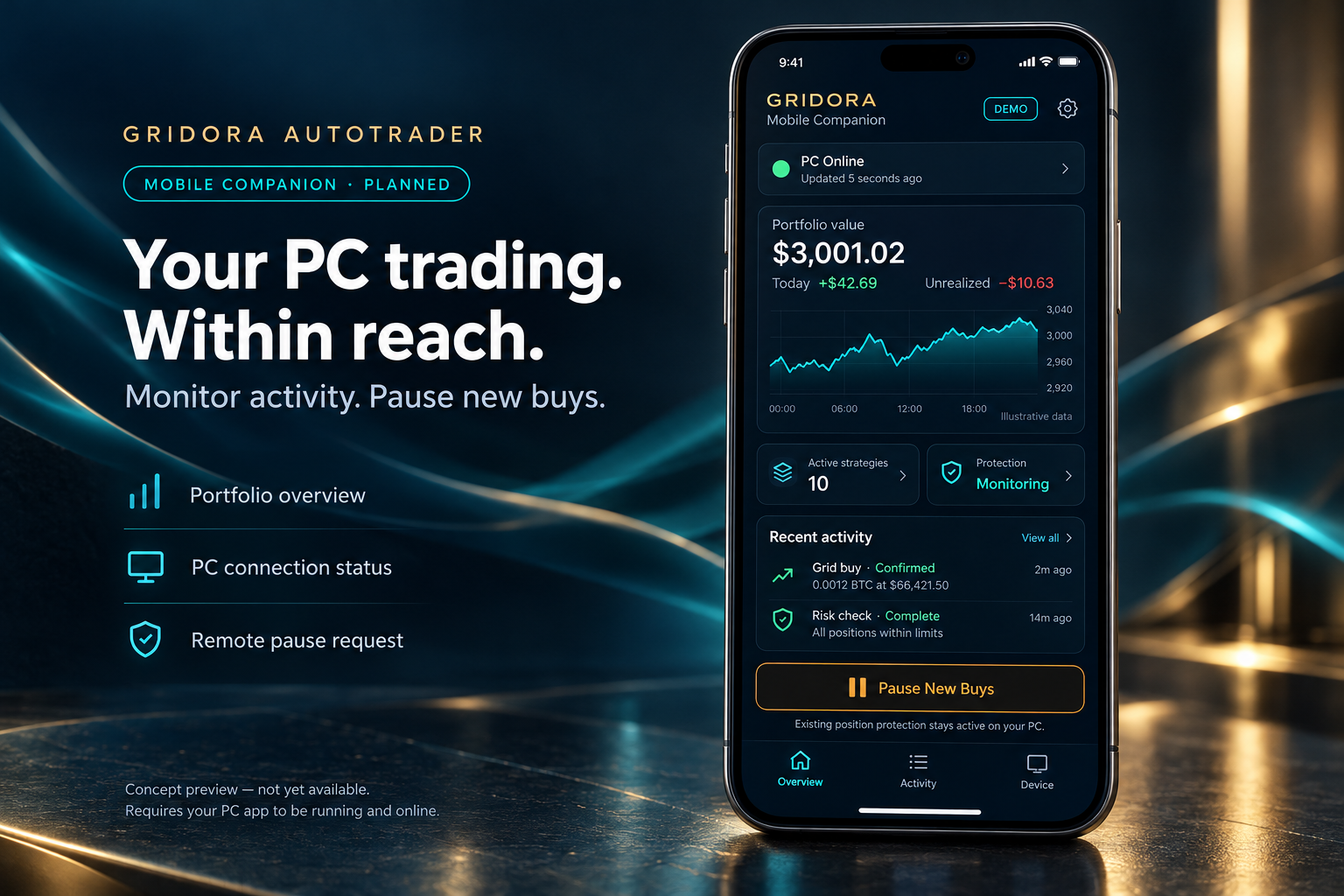
Planned views include portfolio performance, recent activity and the last time your PC reported its status.
The planned control requests a pause on new buys while existing-position protection continues on your running, connected PC.
Connection status and command acknowledgments are planned so an unconfirmed request is never presented as completed.
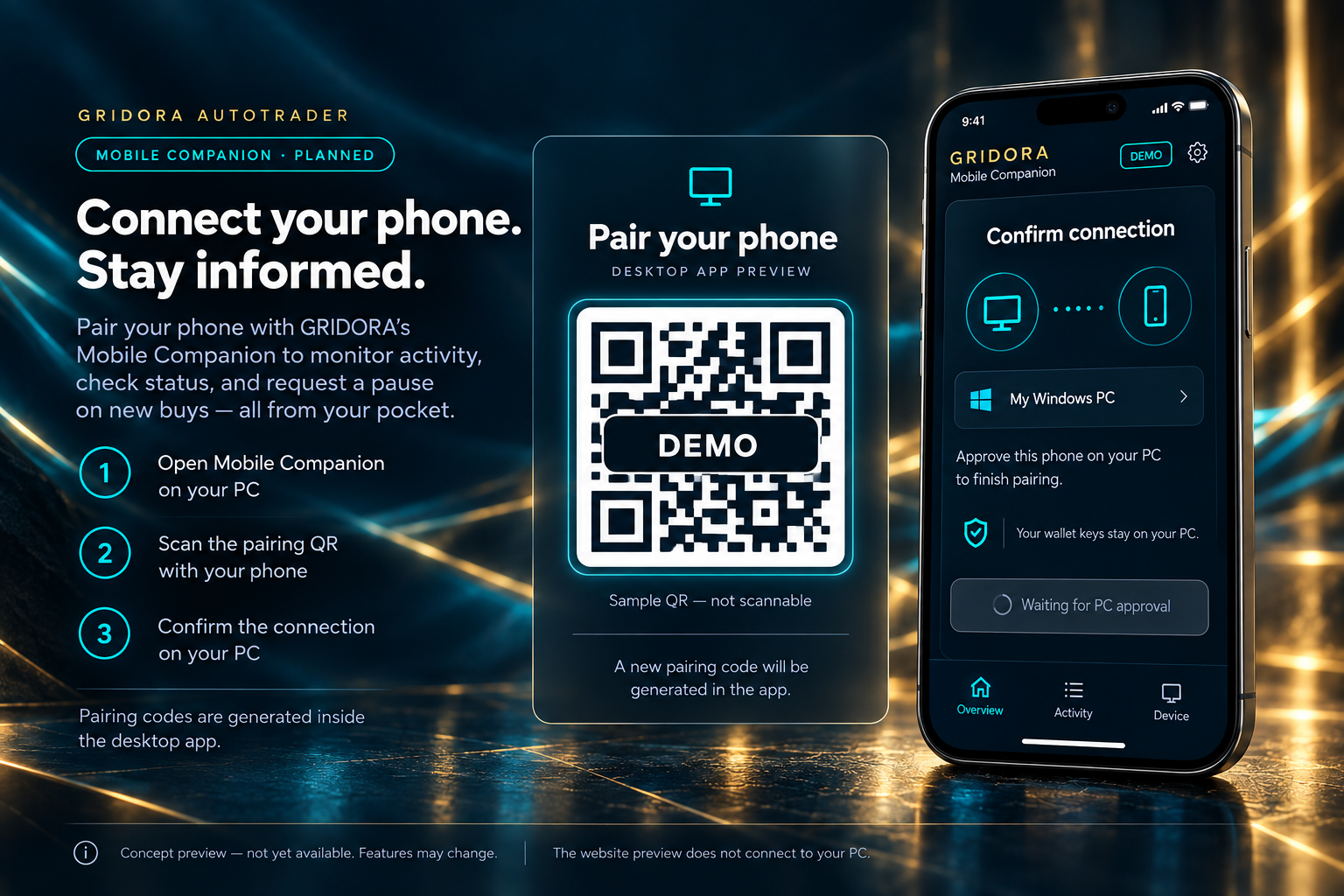
Your PC remains the trading engine. The desktop app must remain running, awake and online. The planned mobile companion does not keep trading or protection running when your PC is off. Do not rely on these planned features until they are released.
Start with Free: automatic settings, loss controls and live trading within the Free limits. Upgrade to Pro for more coins, more chains and higher trading amounts.
Free version available for Windows · Pro subscriptions open November 28, 2026. Protection requires your PC to be on, awake and online. Solana live trading remains experimental in Lab mode.
No credit card. No time limit.
Free plan limits
You accept the Terms of Use & EULA in the installer before installation. Personal use only; unauthorized copying, reverse engineering and redistribution are prohibited, subject to the exceptions in the Terms. Terms of Use & EULA
GRIDORA Pro launches in
November 28, 2026 · 00:00 New York time
GRIDORA Pro subscriptions are open now.
or $149 / year (≈ $12.42 / month)≈ $12.42 / month, billed yearly
Manage or cancel your subscription: gridoradex.com/account
The Stripe checkout page will also ask you to accept the Terms of Use & EULA. Terms of Use & EULA · Refund & Cancellation Policy
Pro subscriptions open November 28, 2026. The Free version is available now.
Check both boxes above to continue.
Opening secure checkout…
Checkout could not be opened. Please try again in a minute or email [email protected].
Pro subscriptions are not open yet.
| Feature | Free | Pro |
|---|---|---|
| Price | $0 | $19.99/month or $149/year |
| Paper trading | Unlimited | Unlimited |
| Live trading amount | Up to $100 | No plan-imposed cap |
| Coins at the same time | 1 | 10 |
| Networks | Base | Base · Ethereum · BNB Chain · Solana (Lab, experimental) |
| Auto-settings (amount · coin · market change) | ✓ | ✓ |
| Downtrend protection · stop-loss | ✓ | ✓ + fine-tuning |
| Coin ranking | Top 3 | Top 10 + scores + daily alerts |
| CSV export | – | ✓ |
| Advanced mode & Lab | – | ✓ |
| Withdraw your funds | Not tied to Pro | Not tied to Pro |
Free has no card requirement or time limit. It allows live trading up to $100 total on Base, one coin at a time, and unlimited paper trading. Network gas and DEX pool fees still apply and vary.
Try Free before upgrading. Except where required by law, Pro payments are not refundable solely because you cancel, do not use Pro, or have time remaining in a paid term. This does not limit your rights for duplicate or unauthorized charges, billing errors, failure to provide the purchased access, or faulty or misdescribed software. Sold through Link, LLC, the merchant of record, may also issue a refund under its own policies.
One subscription activates Pro on one PC, with up to 10 coins. Moving to a new PC is done in the app (up to 3 moves in 30 days). To run two PCs at the same time, buy a second subscription.
After the paid period ends, your plan returns to Free. Your assets remain in your wallet. New trading must stay within Free limits. Withdrawal access is not conditional on a Pro subscription.
No. We charge a flat software fee only. We never take a percentage of your trades or results.
No. The app is non-custodial: your keys are created and stored only on your computer.
Prices are in US dollars, plus applicable taxes. Annual savings compare $149 with 12 monthly payments of $19.99. Once Pro opens, it will renew automatically until canceled through subscription management. Terms and Risk Disclosure.
Billing questions: [email protected]
More installation, backup and recovery help is in the getting-started guide.
Guide & support →No. The app and computer must be on, awake and online. Monitoring and protective actions stop when they are not. Already-sent blockchain transactions may still complete.
Connecting alone does not transfer funds. After you approve an amount and permissions, the app can execute trades within your settings. Never enter your main wallet recovery phrase on this website.
The app enters protect-only mode: new buys pause while protective exits continue. Full stop is a separate action and stops protection too. Exits can fail or fill worse than your limits.
At the end of a paid Pro period, the plan returns to Free. Assets stay in your wallet. New trading is limited to the Free plan; withdrawal access is not conditional on Pro. Final downgrade behavior must be verified before launch.
The app includes Ethereum, Base and BNB Chain integrations, plus Solana through Jupiter. Base is the default. The Free plan trades live on Base; Solana live execution requires Lab (Pro).
The current Free release supports mobile-wallet QR connections (WalletConnect) for compatible wallets. Availability depends on the wallet, network and service status. Paper mode remains a separate option.
The v11.5.0 rename retains the previous application identity and data format. Existing settings, history and app-wallet data are intended to carry forward. Make and verify your encrypted full backup before upgrading.
Yes. The Free plan includes unlimited paper trading and live trading on Base within the Free limits: up to $100 total and one coin at a time. Network gas, DEX pool fees, and other execution costs may apply to live transactions.
Yes. Paper trading uses simulated funds and does not require a wallet or a deposit. Simulated results do not predict live trading results.
Download the current installer from the official GRIDORA download page. Before opening it, check the file’s digital signature and publisher. If the signer is unexpected or Windows shows a security warning, do not install the file; contact support.
Live trading may involve network gas fees, DEX pool fees, slippage, and other execution costs. These costs vary. Review the current estimates and your trading settings before placing trades.
No. You can lose all funds committed to trading. Paper results, backtests and AI analysis cannot predict future returns. Gas, fees and slippage reduce results.
No. The app wallet key is created on your PC and stored there, encrypted by Windows. It is never sent to us. We cannot move, freeze or reverse your funds. If you connect MetaMask or a phone wallet instead, the key stays in that wallet and the app only asks it to approve.
On the blockchain, at your own wallet address. The app is only the tool that signs trades on your PC and sends them straight to the network — not through our servers.
Pro subscriptions open on November 28, 2026. Once open, billing and licensing may require your email, payment references and license status. Wallet keys are never sent to us. Website analytics and third-party network services are described in our Privacy Policy.
We cannot recover your private key or reset the password of your encrypted backup. Recovery requires a valid backup and its password, or another securely retained recovery method. Back up before depositing and store the backup separately from your PC.
Download only from the official download page at gridoradex.com. Windows should show the publisher NYC CAPITAL ASIA INC.; do not install a file with a different or unknown publisher. We never ask for your recovery phrase or private key.
아니요. 앱 지갑의 키는 사용자 PC 에서 만들어지고, 그 PC 안에 윈도우 암호화로 저장됩니다. 회사로 보내지지 않습니다. 회사는 돈을 옮기거나 막거나 되돌릴 수 없습니다. MetaMask·휴대폰 지갑을 연결해 쓰면 키는 그 지갑에 그대로 있고, 앱은 승인을 요청할 뿐입니다.
블록체인 위, 본인 지갑 주소에 있습니다. 앱은 PC 에서 거래에 서명해 네트워크로 바로 보내는 도구일 뿐이며, 회사 서버를 거치지 않습니다.
Pro 구독은 2026년 11월 28일에 시작됩니다. 시작되면 결제와 라이선스 처리에는 이메일, 결제 참조 정보 및 라이선스 상태가 필요할 수 있습니다. 지갑 키는 회사로 전송되지 않습니다. 웹사이트 분석 도구와 외부 네트워크 서비스는 개인정보 처리방침에서 확인하세요.
회사는 개인 키를 복구하거나 암호화된 백업의 비밀번호를 초기화할 수 없습니다. 복구하려면 유효한 백업과 비밀번호 또는 별도로 안전하게 보관한 복구 수단이 필요합니다. 입금 전에 백업하고 PC와 다른 곳에 보관하세요.
gridoradex.com 공식 다운로드 페이지에서만 받으세요. Windows에 게시자 NYC CAPITAL ASIA INC.가 표시되어야 하며, 게시자가 다르거나 알 수 없는 파일은 설치하지 마세요. 회사는 복구 문구나 개인 키를 절대 요청하지 않습니다.
不能。应用钱包的密钥在你的电脑上创建,并由 Windows 加密保存在本机,绝不会发送给我们。我们无法转移、冻结或撤回你的资金。如果你改用 MetaMask 或手机钱包,密钥留在该钱包中,应用只会请求其批准。
在区块链上,你自己的钱包地址中。应用只是在你的电脑上签署交易并直接发送到网络的工具——不经过我们的服务器。
Pro 订阅于 2026 年 11 月 28 日开放。开放后,账单和许可证可能需要你的邮箱、付款凭证和许可证状态。钱包密钥绝不会发送给我们。网站分析和第三方网络服务的说明见我们的隐私政策。
我们无法恢复你的私钥,也无法重置加密备份的密码。恢复需要有效的备份及其密码,或其他安全保存的恢复方式。请在充值前备份,并将备份与电脑分开存放。
只从 gridoradex.com 的官方下载页面下载。Windows 应显示发布者为 NYC CAPITAL ASIA INC.;发布者不同或未知的文件请勿安装。我们绝不会索要你的助记词或私钥。
Non. La clé du portefeuille de l’app est créée sur votre PC et y reste, chiffrée par Windows. Elle ne nous est jamais envoyée. Nous ne pouvons ni déplacer, ni bloquer, ni annuler vos fonds. Si vous connectez MetaMask ou un portefeuille mobile, la clé reste dans ce portefeuille et l’app lui demande seulement d’approuver.
Sur la blockchain, à l’adresse de votre propre portefeuille. L’app est seulement l’outil qui signe les ordres sur votre PC et les envoie directement au réseau — sans passer par nos serveurs.
Les abonnements Pro ouvrent le 28 novembre 2026. À leur ouverture, la facturation et les licences pourront nécessiter votre e-mail, des références de paiement et le statut de la licence. Vos clés ne nous sont pas envoyées. Consultez notre politique de confidentialité pour les outils de mesure d’audience et les services réseau tiers.
Nous ne pouvons ni récupérer votre clé privée ni réinitialiser le mot de passe de votre sauvegarde chiffrée. La restauration nécessite une sauvegarde valide et son mot de passe, ou un autre moyen de récupération conservé en sécurité. Sauvegardez avant tout dépôt et conservez la copie séparément du PC.
Téléchargez uniquement depuis la page officielle de gridoradex.com. Windows doit afficher l’éditeur NYC CAPITAL ASIA INC. ; n’installez pas un fichier dont l’éditeur est différent ou inconnu. Nous ne demandons jamais votre phrase de récupération ni votre clé privée.
Nein. Der Schlüssel der App-Wallet wird auf Ihrem PC erzeugt und dort, von Windows verschlüsselt, gespeichert. Er wird nie an uns gesendet. Wir können Ihr Geld weder bewegen noch sperren noch zurückbuchen. Wenn Sie MetaMask oder eine Handy-Wallet verbinden, bleibt der Schlüssel dort; die App bittet nur um Bestätigung.
Auf der Blockchain, an Ihrer eigenen Wallet-Adresse. Die App ist nur das Werkzeug, das Trades auf Ihrem PC signiert und direkt ans Netzwerk sendet — nicht über unsere Server.
Pro-Abonnements starten am 28. November 2026. Danach können für Abrechnung und Lizenzierung Ihre E-Mail-Adresse, Zahlungsreferenzen und der Lizenzstatus erforderlich sein. Wallet-Schlüssel werden nicht an uns gesendet. Website-Analyse und externe Netzwerkdienste sind in unserer Datenschutzerklärung beschrieben.
Wir können Ihren privaten Schlüssel nicht wiederherstellen und das Passwort Ihrer verschlüsselten Sicherung nicht zurücksetzen. Sie benötigen eine gültige Sicherung und deren Passwort oder eine andere sicher aufbewahrte Wiederherstellungsmöglichkeit. Sichern Sie vor einer Einzahlung und bewahren Sie die Sicherung getrennt vom PC auf.
Laden Sie nur von der offiziellen Downloadseite auf gridoradex.com herunter. Windows muss den Herausgeber NYC CAPITAL ASIA INC. anzeigen; installieren Sie keine Datei mit anderem oder unbekanntem Herausgeber. Wir fragen niemals nach Ihrer Wiederherstellungsphrase oder Ihrem privaten Schlüssel.
No. La clave de la cartera de la app se crea en tu PC y se guarda allí, cifrada por Windows. Nunca se nos envía. No podemos mover, congelar ni revertir tus fondos. Si conectas MetaMask o una cartera móvil, la clave se queda en esa cartera y la app solo le pide aprobación.
En la blockchain, en la dirección de tu propia cartera. La app es solo la herramienta que firma las operaciones en tu PC y las envía directamente a la red, sin pasar por nuestros servidores.
Las suscripciones Pro abren el 28 de noviembre de 2026. Cuando se abran, la facturación y las licencias podrán requerir su correo, referencias de pago y estado de licencia. Las claves del monedero no se nos envían. Consulte nuestra Política de privacidad sobre analítica web y servicios de red externos.
No podemos recuperar su clave privada ni restablecer la contraseña de su copia cifrada. La recuperación requiere una copia válida y su contraseña, u otro método de recuperación guardado de forma segura. Haga la copia antes de depositar y guárdela separada del PC.
Descargue solo desde la página oficial de gridoradex.com. Windows debe mostrar el editor NYC CAPITAL ASIA INC.; no instale un archivo con un editor distinto o desconocido. Nunca pedimos su frase de recuperación ni su clave privada.
Нет. Ключ кошелька приложения создаётся на вашем ПК и хранится там в зашифрованном Windows виде. Он никогда не отправляется нам. Мы не можем переместить, заморозить или отменить ваши средства. Если вместо этого вы подключаете MetaMask или кошелёк на телефоне, ключ остаётся в этом кошельке, а приложение лишь просит его одобрить действие.
В блокчейне, на адресе вашего собственного кошелька. Приложение — лишь инструмент, который подписывает сделки на вашем ПК и отправляет их прямо в сеть, а не через наши серверы.
Подписки Pro открываются 28 ноября 2026 года. После открытия для оплаты и лицензирования могут потребоваться ваш email, данные платежа и статус лицензии. Ключи кошелька нам никогда не отправляются. Аналитика сайта и сторонние сетевые сервисы описаны в нашей Политике конфиденциальности.
Мы не можем восстановить ваш приватный ключ или сбросить пароль зашифрованной резервной копии. Для восстановления нужна действительная резервная копия и её пароль или другой надёжно сохранённый способ восстановления. Сделайте резервную копию до пополнения и храните её отдельно от ПК.
Скачивайте только с официальной страницы загрузки на gridoradex.com. Windows должна показывать издателя NYC CAPITAL ASIA INC.; не устанавливайте файл с другим или неизвестным издателем. Мы никогда не просим вашу фразу восстановления или приватный ключ.
The Free version for Windows is available now. Start in paper mode, then go live with a small amount when you understand the results. macOS (Apple Silicon and Intel) follows later.
No checkout or wallet connection happens on this website. Trading runs only in the desktop app on your PC.
NYCA LABS
Our brand · Our technology · Our vision
One Company. One Distinctive Brand. Four Innovative Products.
Intelligent Solutions. Everyday Possibilities.
NYCA LABS is our proprietary software brand, owned and developed by NYC Capital Asia Inc., a New York-based technology company.
GRIDORA AUTOTRADER is a flagship product within the NYCA LABS family of software solutions.
From automated trading and equipment intelligence to business cost management and personal subscription tools, our products share one vision: making technology more practical, accessible, and useful in everyday life.
Owned & developed by NYC Capital Asia Inc. · New York, USA
Planned subscription terms: Refund exceptions and online cancellation. Trading losses, gas and DEX fees are not covered by the subscription refund policy. Paid subscriptions open on November 28, 2026.